> For the complete documentation index, see [llms.txt](https://acecounter.gitbook.io/guide/llms.txt). Markdown versions of documentation pages are available by appending `.md` to page URLs; this page is available as [Markdown](https://acecounter.gitbook.io/guide/utilize/term/ftp.md).
# #FTP
에이스카운터 서비스 이용을 위해서는 웹페이지 소스에 분석 스크립트 설치가 필요합니다. 이때 스크립트 설치를 위해서는 FTP 접속 정보가 필요합니다.
## FTP 란?
***
인터넷을 통해 한 컴퓨터에서 다른 컴퓨터로 파일을 전송할 수 있도록 하는 방법과, 파일 전송을 위한 FTP 클라이언트 프로그램을 FTP (File Transfer Protocol)라고 합니다.
상대방 컴퓨터에 접속하고 파일을 받거나 보내는 일을 할 수 있으며, 웹사이트 수정을 위해 FTP 클라이언트 프로그램을 이용해 웹사이트에 접속하는 것을 말합니다.
> ※ FTP 클라이언트 프로그램 (=FTP) 종류: 알FTP, FileZillaFTP (파일질라FTP) 등
## FTP 접속 방법
***
접속을 위해서는 일반적으로 FTP 접속 주소(Host), 포트 번호, 아이디, 비밀번호 정보가 필요합니다. 정상적으로 접속이 된 후 파일을 수정하거나, 다운로드, 업로드 작업을 할 수 있습니다. (일부 임대형 쇼핑몰의 경우 관리자 페이지에서 웹 FTP 기능을 제공하고 있습니다.)
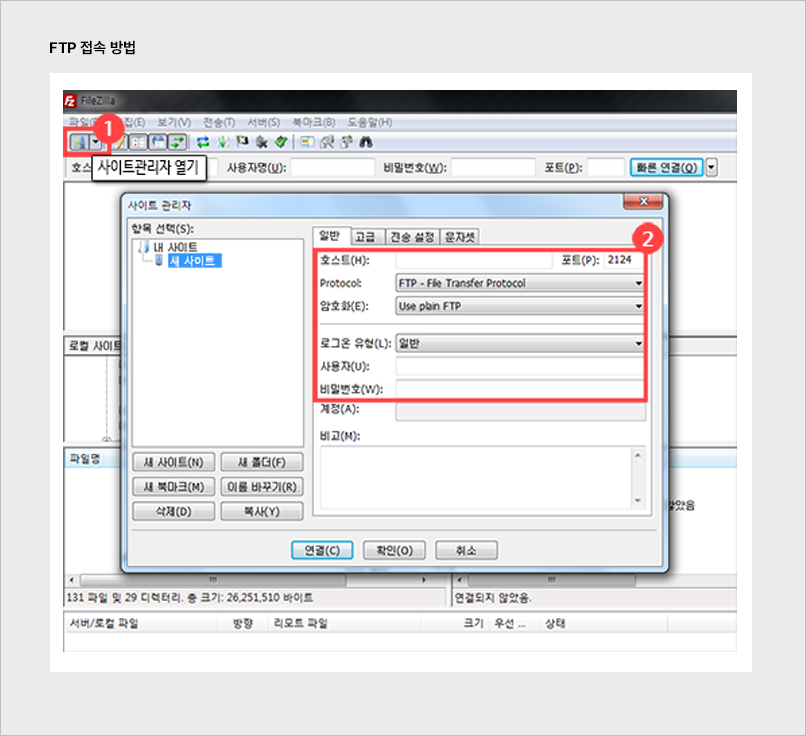
\[참고] FTP 접속 예시 - FileZilla (파일 질라 FTP)
① 상단 사이트 관리자 열기 클릭
② 호스트, 포트, 사용자, 비밀번호 입력
\[참고] FTP접속 예시 - 알FTP
① 상단 접속하기 클릭
② FTP 주소, 사용자 ID, 비밀번호, 포트 번호 입력
> TIP. 에이스카운터 스크립트 설치 대행 서비스 안내 분석 스크립트 설치가 어려우실 경우 버전 별 최초 1회에 한하여 무료로 설치 지원해 드립니다.